VR SHOOTING SETUP GUIDE
VR Shooting Simulator: What Equipment Comes With a Complete Setup?
A complete commercial VR shooting setup ships as seven hardware and install modules - frame, guns, tracking, headset, spectator display, host computer, power and install - plus the two software layers that decide your player cap and your repeat play. This guide lists every module, what to verify in each, and what is still missing from the box.
Module Checklist Guns and Tracking Headset and Display Power and Install Session Software Game Library
600-1200W
Planning Power per Cabinet
1. The Short Answer: Seven Modules, Two Software Layers
A complete commercial VR shooting setup ships as seven hardware and install modules plus two software layers: Module 1 frame, Module 2 guns, Module 3 tracking, Module 4 headset, Module 5 spectator display, Module 6 host computer, Module 7 power and install, then Module 9 session software and Module 10 game library. Anything sold as a complete setup that skips one of those modules is leaving you to buy it yourself later.
This is the module list referenced by the rest of our VR shooting series, and the numbering is deliberate: the same module numbers appear in the multiple players configuration guide when it explains which module sets the simultaneous-player ceiling. Read this article to know what arrives in the crate; read that one to know how many players it can carry.
7-Module Setup: M1 frame, M2 guns, M3 tracking, M4 headset, M5 spectator display, M6 host computer, M7 power and install - then the M9 session software and M10 game library that turn hardware into a bookable attraction.
2. The Seven Modules and What to Verify in Each
Each module comes with one specification that decides whether the whole setup fits your venue, so verify the line under the module rather than the marketing headline. The table below is our purchase checklist in module order.
| Module |
What ships |
The one thing to verify |
| M1 Frame or enclosure |
Cabinet, booth frame or arena structure that sets footprint and player positions |
Footprint against ceiling height, door width and floor load |
| M2 Guns |
Tracked pistols or rifles - 1 per single cabinet, 2 per double booth, up to 4 on a multi-player platform |
Guns tracked per unit, plus at least one spare |
| M3 Tracking |
Base stations or tracking cameras with their mounting hardware |
Covered volume in square meters and occlusion at the edges |
| M4 Headset |
One headset per player position with cables and face pads |
Spare headset and a hygienic face-pad rotation stock |
| M5 Spectator display |
External screen that mirrors the game to the queue |
Size, mounting height and how it mirrors the live session |
| M6 Host computer |
PC or console that runs the session and the scoreboard |
Spec headroom for future titles and updates |
| M7 Power and install |
Power circuit, networking, mounting, calibration and commissioning |
Circuit rating, UPS cover and cable routing |
| M9 Session software |
Booking, session timing, sanitisation workflow and operator console |
Simultaneous session cap and staff workflow |
| M10 Game library |
Preinstalled titles plus the update channel |
Title count by age tier and which titles support linked play |
Based on our VR Battle Simulator specification, one double booth ships as a complete frame with two tracked firearms, its own tracking set, two headset positions, a 40+ title library and 2000W power draw - which is what a genuinely complete module list looks like on paper. The two-player VR battle booth is a useful reference unit when you compare quotes from other suppliers, because you can tick each module off against it.
Planning note: module lists, footprints and power figures in this article are planning references compiled from published equipment specifications and vendor documentation dated 2026. They are not quotations and they do not cover your building conditions. Confirm the delivered packing list, circuit rating and floor load with your supplier and your contractor before ordering or budgeting.
3. The Two Software Layers Most Quotes Leave Out
Modules 9 and 10 are the two layers buyers most often discover after delivery: session software and the game library. Session software sets the simultaneous-player cap and the sanitisation workflow, and the library decides how many age groups the machine can serve. Together they decide the revenue ceiling of the hardware you just bought.
- M9 session software - how many players one match admits, how sessions are timed, and whether the sanitisation step is built into the operator screen
- M10 game library - how many titles ship, how they split by age tier, and which titles support linked play across machines
- Update route - how new titles are delivered, at what cost, and whether an operator can schedule updates without a technician
- Scoreboard layer - whether results persist between visits, because a visible ranking is what converts a one-off session into a repeat booking
Ask for the software layers as two named line items. A supplier that prices the library separately is not hiding a cost - it is telling you the update channel is a real product, and that is the channel your repeat play depends on. The compatible VR shooting game library guide covers what actually runs on each machine class, and the game modes by audience guide covers which titles suit which group.
4. What Is Not in the Box (and What It Costs Later)
A complete setup covers the machine, not the room. Six items are routinely missing from a delivery and each one has a lead time, so budget and schedule them before the container lands.
- Power circuit upgrade and UPS cover - commercial VR gun cabinets draw roughly 600 to 1,200 W per cabinet as a planning reference, and a row of five needs a dedicated circuit rather than a shared socket run.
- Floor, walls and flooring buildout - machine footprint is not the same as the finished room, and the theming around the machine is a separate contractor line.
- Network and Wi-Fi - linked multi-machine sessions need a stable local network, and a busy venue network is shared with ticketing.
- Spare headset, face pads and a cleaning station - hygiene rotation is an operating cost, not an accessory.
- Staff training and the operations manual - session scripting, calibration checks and age policy enforcement all need a written routine.
- Ticketing integration, signage and launch marketing - the module list ends at the machine working, not at the first paid booking.
The cost side of the same list is covered in the free-roam VR arena cost and ROI blueprint, which is the right companion read if you are building a budget rather than a packing list.
5. Sizing the Setup to the Room You Actually Have
Module 1 decides everything downstream, so start from the footprint and work up to the player count rather than the other way round. The table maps four commercial configurations to published first-party dimensions and the modules they stress hardest.
| Configuration |
Published footprint |
Players per session |
Modules most affected |
| Single-player cabinet |
L1.33 x W1.00 x H2.38 m (VR Terminator) |
1 |
M1, M2, M4 |
| Double shooting booth |
L1.88 x W2.47 x H2.25 m (VR Battle B2) |
2 |
M1, M2, M3 |
| Double standing platform |
L2.67 x W2.10 x H2.70 m (HTC VIVE platform) |
2 |
M1, M3, M5 |
| Multi-player shooting platform |
Platform footprint confirmed at site survey |
4 |
M2, M3, M6 |
| Free-roam arena 2.0 |
About 100 sq m of free-roaming space for up to 8 players |
4-8 |
M3, M6, M9 |
Two sizing rules save money here. First, one 8-player arena uses one supervision point while five separate cabinets need five handovers per cycle - the operating difference is explained in the players per hour capacity model. Second, mixed formats beat a single format: a row of pair booths plus one arena gives walk-in pairs and pre-booked groups two different products from one floor.
For a mixed floor the double-player HTC VIVE standing platform fills the pair-play row, the single-player VR Terminator cabinet covers the compact family corner, and the free-roaming VR arena 2.0 carries the group bookings - three different modules of the same list, one coherent zone.
6. The Module-by-Module Acceptance Checklist
Run this list against the delivered machine before you sign the acceptance sheet, module by module. Every line maps to something that is expensive to discover a month after installation.
- M1 - confirm the installed footprint matches the drawing, including service clearance for the door and the rear panel.
- M2 - count the tracked guns against the order and test each one through a full magazine or round cycle.
- M3 - walk the full play area and watch for tracking drop-outs at the edges and behind structures.
- M4 - check headset fit across different head sizes and confirm the spare unit and face-pad stock arrived.
- M5 - confirm the spectator screen shows live gameplay and the scoreboard, not just a loop video.
- M6 - ask the supplier to state the spare headroom for future titles in writing.
- M7 - verify circuit rating, UPS behaviour during a power cut, and cable protection under public foot traffic.
- M9 - run one full session with staff driving the operator screen, including the sanitisation step.
- M10 - open the library, count the titles by age tier, and test one linked-play session across two machines.
Then compare the delivered list against the VR shooting simulator collection to confirm which configuration the modules add up to, and use the free 3D layout service to place each configuration on your own floor plan before the equipment is ordered.
7. Featured NextPlay Active Gaming Equipment
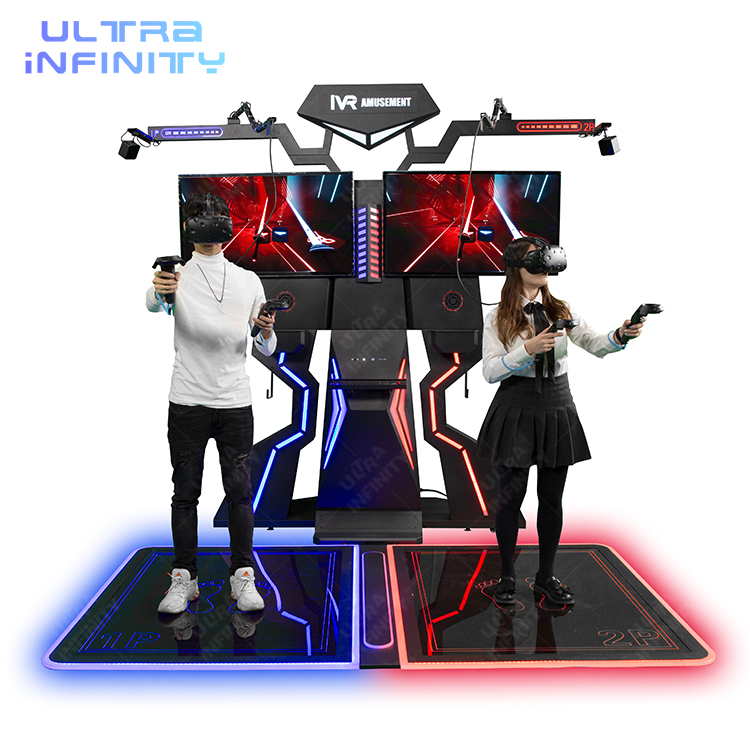
M1 + M3 + M5
HTC VIVE VR Standing Platform (Double)
Two-player HTC VIVE standing platform in a 2.67 x 2.10 x 2.70 m frame with a 100-title library, 2500W power draw and a built-in spectator screen position.
View Details ›
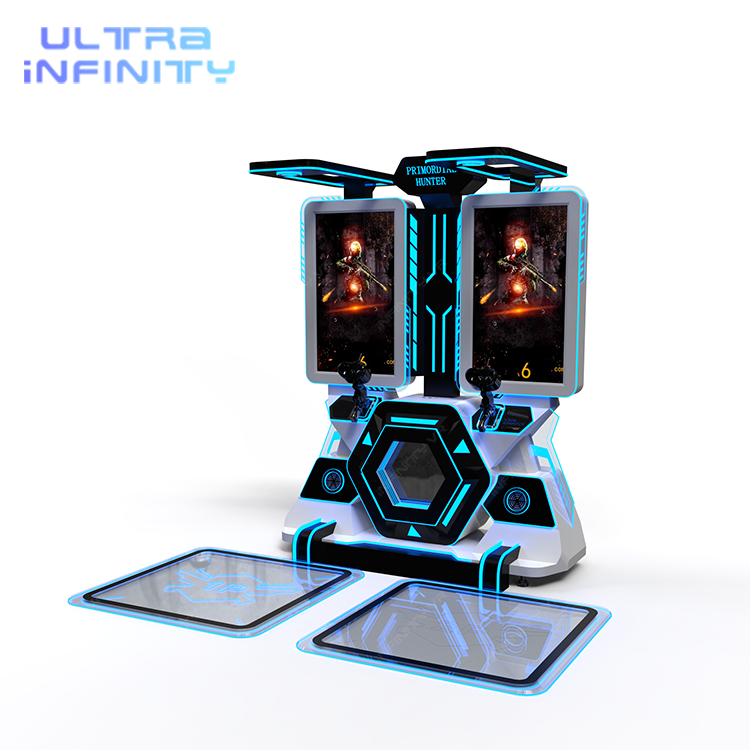
The Reference Unit
VR Battle Shooting Simulator
Complete double booth: frame, two motion-capturing firearms, its own tracking set, 40+ game library and online versus. The unit to tick your module list against.
View Details ›
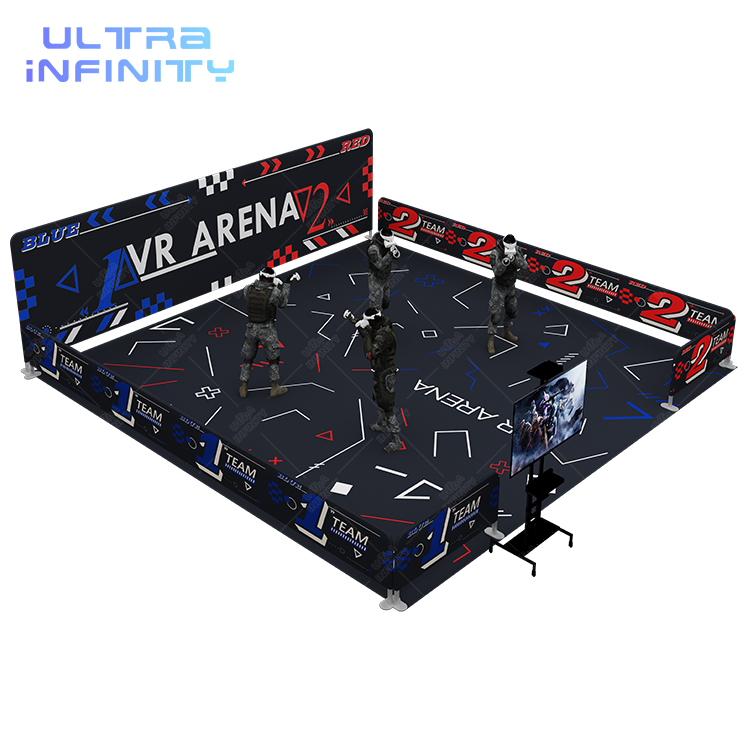
M3 + M6 + M9
Free Roaming VR Arena 2.0
Free-roam arena setup for up to 8 players with 24+ maps and one supervision point. The group module of the list - hardware, tracking volume and session software together.
View Details ›
8. VR Shooting Setup Equipment: FAQ
The equipment questions buyers ask before signing a VR shooting order, answered directly.
What equipment comes with a complete VR shooting simulator setup?
Seven hardware and install modules - frame, guns, tracking, headset, spectator display, host computer, power and install - plus two software layers: session software and the game library. A quote missing a module means you buy that part separately.
How many headsets and guns are included?
One headset per player position and one tracked gun per shooter: 1 each for a single cabinet, 2 for a double booth, and up to 4 on a multi-player shooting platform. Confirm at least one spare headset and spare face pads are in the order.
What tracking hardware ships with the machine?
Base stations or tracking cameras with mounting hardware, sized to the play area. Module 3 decides how much volume is covered and how many guns the system can resolve at once, so verify the covered square meters rather than the station count alone.
How much power does a VR shooting cabinet need?
Plan on roughly 600 to 1,200 W per commercial VR gun cabinet as a planning reference. Based on our published specifications, a single-player VR Terminator is rated 600W at 110-240V, a double VR Battle booth is 2000W and a double HTC VIVE standing platform is 2500W, so a row of machines needs its own circuit.
What is not included in a standard setup?
The room: power circuit upgrades and UPS, floor and wall buildout, venue networking, spare headsets and face pads, staff training, and ticketing, signage and launch marketing. Budget those as separate line items with their own lead times.
How much space does a complete setup need?
From about 1.33 x 1.00 m for a single cabinet up to roughly 100 sq m of free-roaming space for an 8-player arena. The multiple players configuration guide compares the configurations by player count, and the layout service sizes them against your own floor plan.
Can I start with one machine and add more later?
Yes, and that is the usual route: begin with one booth or cabinet, then add a second unit for pair or linked play and an arena for group bookings. Confirm before purchase that the session software and library support linked play across multiple machines.
How long does installation take?
Allow for delivery plus power, networking, mounting and calibration, then a staff training session. The exact timeline depends on how much of the room buildout is already finished, so schedule installation after the power circuit and flooring are signed off.
Does the setup include games, or are they extra?
A commercial machine ships with a preinstalled library - our double booth ships with 40+ titles and our arena with 24+ maps - so content is part of the module list. What you still need to confirm is the update channel and any licence cost for future titles.
How do I compare two suppliers module by module?
Ask both for the same nine line items with quantities and ratings, then compare like for like: guns tracked per unit, covered tracking volume, headset count and spares, screen size, power draw, session cap and title count by age tier. A supplier that cannot itemise those is not shipping a complete setup.
Check the Module List Against Your Own Floor
The VR shooting simulator collection shows which modules each configuration includes, and the free 3D layout service maps the setup onto your floor plan - so the seven-module list becomes a real equipment order instead of a brochure.

