VR TRACKING - VOLUME, NOT FEATURE
How Does VR Tracking Work? Inside-Out Cameras vs Outside-In Base Stations
How does VR tracking work? A headset fuses inertial and optical data into a pose stream many times per second, inside a volume the system can actually see. Here is how each tracking family builds that volume, how they fail on a paid floor, and what to test before you buy.
The tracking volume 3DoF vs 6DoF Outside-in Inside-out Occlusion Latency
21-42 ms
Measured Latency
1. How Does VR Tracking Work: The Short Answer
VR tracking answers one question many times every second: where is this object, and which way is it facing? The headset asks it about your head, the controllers ask it about your hands, and the answer arrives as a stream of positions that the software uses to render a scene from the right viewpoint. If that stream is accurate, fast and uninterrupted, VR works. If it is not, guests feel it immediately - as swimming, as lag, as a controller that jumps.
The important thing for a venue is that tracking is not a feature you switch on. It is a volume: a region of the floor where the system can see what it needs to see. Everything else in a machine specification - how many players, what game modes, where the machine can be placed - follows from the shape and size of that volume. Our companion guide on how virtual reality works walks the full sense-render-display-correct loop; this article stays on stage one, because stage one is where most paid sessions are won or lost.
There are two families of hardware that build the volume, and they fail in opposite ways:
- Outside-in - base stations sit in the room and look at the headset and controllers. Very accurate, works in bright rooms, but the installer has to place and calibrate hardware around the play area.
- Inside-out - cameras are built into the headset and look at the room. No base stations, faster to deploy, but the headset can only see what the cameras can see, and controllers disappear the moment they leave that view.
Both are used commercially. The rest of this article explains what each one actually measures, where each one breaks on a busy floor, and what to ask before you sign a purchase order.
2. What Tracking Actually Measures: Pose, Axes and Sample Rate
Tracking hardware does not report "the guest is facing the screen". It reports a pose: a position in three axes plus an orientation in three axes. That is six numbers, which is why the term is 6DoF (six degrees of freedom) - three for where, three for which way. Machines that only report orientation, so the guest can look around from a fixed point, are 3DoF, and the difference between the two is the difference between a cinema and a game. The full set of axes is broken down in our guide to what 6DOF means.
No single sensor produces that pose. A headset fuses two very different inputs:
- Inertial sensors (accelerometers and gyroscopes) - fast and always available. They detect rotation and acceleration hundreds of times per second, so even the smallest head movement updates the picture. Their weakness is that they cannot tell you where you are, only how you changed: small errors accumulate into drift.
- Optical tracking - slow-moving by comparison, but absolute. Cameras or base stations give a true position in the room, which re-anchors the inertial estimate and stops drift.
Software then fuses the two into one pose stream. The practical consequence is that tracking quality is not just sensor quality: it is the quality of the sensor fusion, and it degrades gracefully when one input is missing. A headset that loses its optical reference for a moment keeps rendering from the inertial estimate, which is why a tracking fault often looks like a slow slide rather than a freeze.
Two numbers matter to a buyer. The first is the sample rate - how often a new pose is estimated. The second is the time between taking a measurement and showing the matching picture, which is the latency budget discussed later in this article.
Ask a supplier two questions with numbers in the answer: what is the tracking sample rate, and what is the measured motion-to-photon latency? Answers without numbers mean tracking has never been measured on that machine.
3. Outside-In Tracking: Base Stations That Sweep the Room
Outside-in tracking is the system most people picture when they think of room-scale VR. Two small base stations are mounted in opposite corners of the play area, aimed inward. Each unit spins an internal rotor that sweeps a pair of infrared beams across the room; a headset or controller covered in photosensors records exactly when each beam crossed each sensor, and the timing gives its position. Published teardown figures put the rotor at roughly 3,600 RPM, which produces about 60 sweeps per second per axis.
The accuracy that comes out of that is the reason this family still appears in commercial products. Independent measurements reported jitter below 0.3 mm and positional RMS around 1.5 mm - sub-millimetre stability in a room-scale space, with no cameras on the guest. Valve specifies the practical SteamVR play volume as roughly 5 x 5 m with two base stations and about 10 x 10 m with four.
Outside-in wins where accuracy and repeatability matter:
- Stable in bright rooms. The tracked object is not looking for visual features, so shop-centre lighting, LED signage and daylight do not confuse it.
- Tracked objects stay tracked. Because the base stations do the seeing, a controller turned behind the guest back or covered by a hand keeps reporting as long as a sensor line to a station exists.
- Low cost per tracked object. Adding a second controller, a gun or a tracker to the same volume is cheap - the infrastructure is already in the room.
- Precise small-object tracking. This is why outside-in rigs are still common in competitive shooters and esports training, and why the gun-side of the problem is treated separately in how VR gun tracking works.
The costs are equally clear, and they are all installation costs. The stations must be mounted high enough and angled to cover the play area, cabled or powered, and calibrated; a cable that was fine on day one becomes a fault call after a year of shopping-centre footfall. Line of sight matters: a base station cannot see through a pillar, and a person standing between a station and a controller blocks that measurement exactly as a body blocks a camera.
Source basis: base-station rotor speed, sweep rate, jitter and RMS figures, and the SteamVR play volume, are manufacturer and independently measured values already recorded in our verified-facts registry.
4. Inside-Out Tracking: Cameras on the Headset
Inside-out tracking inverts the geometry: instead of the room watching the guest, the headset watches the room. Four or more cameras on the front and sides of the headset feed a SLAM (simultaneous localisation and mapping) pipeline that builds a map of visible features and locates itself inside that map, again fused with inertial data.
For a venue the appeal is deployment:
- Nothing to install. No base stations, no mounting heights, no cables across the room. A station can be set up, moved or packed away by staff rather than by an installer.
- The tracked volume scales with the room. Because the sensors travel with the guest, a larger open floor does not need more infrastructure - which is one reason standing platforms and roaming rigs have become the standard shape for quick-deploy attractions.
- Fewer failure points. There is no separate device to be knocked, blocked or unplugged.
The costs are specific and worth writing down, because they are exactly the faults a venue sees in week three:
- Occlusion of controllers. Vendor engineering documentation is blunt about this: the headset cameras have blind areas, and a controller that leaves the field of view loses tracking. Hands relaxed at the sides, a gun raised above the head, or two players standing back to back all produce dropouts.
- Poor visual conditions. Featureless surfaces - a plain white wall, a smooth polished floor, a floor-to-ceiling glass frontage - give SLAM little to lock onto. Direct sunlight and strong infrared sources can saturate the cameras.
- Motion in the wrong direction. Guests who move fast in a visually repetitive space put more load on the map, so a room with a bare pattern-free floor is harder to track than the same room with a mat and visible edge markings.
None of that makes inside-out the wrong choice. It makes the room part of the specification. A mat, a defined boundary and a few visual features are cheap, and they convert a fragile tracking volume into a reliable one.
Source basis: inside-out occlusion behaviour (controllers leaving the camera field of view losing tracking) is documented in vendor engineering guidance; the plain-surface and bright-light limitations are widely reported SLAM constraints.
5. The Occlusion Problem on a Paid Floor
In a demo room, occlusion is an inconvenience. On a paid floor it is a queue problem, because a lost pose usually ends the session rather than pausing it. There are four occlusion patterns worth designing against before installation day.
- Guest-blocks-guest. In an outside-in room, bodies standing between a base station and a controller cut the measurement for a moment. In an inside-out room the equivalent is one guest walking across another guest field of view while both are aiming. Both produce the same complaint: "my gun stopped working".
- Edge dead zones. The usable volume is smaller than the room. Corners, the strip under a low beam and the band behind the entrance are the places where tracking is weakest, and they are also the places guests drift into when a game gets exciting.
- Reflective and mirrored surfaces. Polished floors, glass partitions and mirrored columns produce stray reflections that confuse optical tracking. A mirror is also a safety problem, which is why venue safety guidance treats glass frontage as a planning constraint as much as a branding asset.
- Tracked objects out of view. This is the inside-out speciality: a guest holding a controller at hip height while looking up loses that controller even though the room is perfectly lit.
The design answer is not more hardware, it is a boundary. Define the play area with a physical edge the guest can feel and a virtual boundary the headset can show, keep the reflective surfaces out of the volume or matte them, and choose game modes that keep hands and guests inside the space they were given. That is the same design logic the wider station build uses, described in our guide to what a VR station is made of.
Rule of thumb: give the tracking volume a physical boundary and the software a documented safe area. Blind spots you designed for become gameplay; blind spots you did not design for become refunds.
6. From Tracking Sample to Photon: Where the Latency Goes
Tracking can be accurate and still feel wrong, because the picture must arrive while the movement is still happening. The measurement that matters is motion-to-photon latency: the time from the guest moving to the corresponding pixels leaving the display.
Peer-reviewed measurement work puts real headset latency in the range of roughly 21 to 42 ms, falling to about 2 to 13 ms for a well-learned task where the user has adapted to the delay. Manufacturer figures for one widely deployed commercial family are around 22 ms for the headset and about 31 ms for a controller. That gap between head and hand is worth remembering, because a guest perceives a lagging controller long before they perceive a lagging view.
The budget breaks down into stages you can discuss with a supplier:
| Stage |
What happens |
What it costs you |
| Sensing |
Inertial and optical samples are captured. |
Hundreds of poses per second; the guest cannot feel this stage alone. |
| Fusion and prediction |
Sensor data becomes a predicted pose for the frame currently being drawn. |
Prediction buys time back, but a wrong prediction appears as overshoot when the guest stops moving. |
| Render and transfer |
Two eye views are drawn and sent to the headset. |
The heaviest stage on PC-tethered systems; the reason a heavy scene is specified with the right computer, not just the right headset. |
| Display and persistence |
The image is held on the panel for the exposure time. |
This is where reprojection helps: it can re-warp an existing frame to a newer pose, hiding display lag. |
The crucial limit is what reprojection cannot do. It can correct the angle of a frame you already rendered; it cannot invent a pose you never measured. So when tracking drops out, no amount of clever display work will fix the experience - the guest sees the world move without their head moving, which is precisely the sensory conflict that makes people feel unwell. That is also why tracking faults and comfort problems are so often the same complaint.
Reprojection hides display latency. It cannot hide lost tracking. If a supplier answers every comfort question with a reprojection feature, ask what the tracking drop rate is.
7. Calibration, Drift and the Mistakes That Cost Sessions
Most tracking faults we see come from four avoidable setup mistakes rather than from hardware failure.
- Base stations at the wrong height or angle. Stations aimed too low create a floor-level coverage gap; stations aimed at a shallow angle across the room create a long thin volume that works at the near end and fails at the far end. Mount high, aim to cover the corners, and re-check after any re-fit of the room.
- Reflective floors and glass. A polished floor doubles the reflections the system has to disambiguate, and a glass wall doubles them again. Matte flooring, a protective mat or careful boundary placement solves most of it.
- Uncalibrated boundaries. A boundary that does not match the physical edge teaches guests to walk into the worst-covered part of the room. Walk the boundary with a real guest height before the first paying session.
- Consumables nobody tracks. Low controller batteries, worn cables and loose connectors all surface as tracking symptoms. A weekly inspection slot is part of uptime, not an afterthought.
One more source of drift has nothing to do with the machine: the room changes. A new LED screen in the frontage, a seasonal decoration, a rearranged queue barrier. Any of those can move the reflective or occluding geometry around the play area, so tracking should be re-verified after every fit-out change rather than assumed.
8. How to Test Tracking Before You Buy
You can evaluate tracking in about fifteen minutes on a demonstration floor, with no instrumentation. These five actions expose the failure modes above.
- Turn your head as fast as you can and stop abruptly on a fixed object. A well-tracked system settles instantly. Overshoot that takes a moment to catch up is prediction error, and it is what a guest feels after a fast turn.
- Have two people cross paths while both are aiming. This is the guest-blocks-guest test, and it is the single most useful check for an arena-style machine.
- Walk to the very edge of the marked area and aim at the closest corner. If the hands start drifting or freezing at the boundary, the usable volume is smaller than the floor plan suggests.
- Take a hand behind your back or above your head for two seconds. On inside-out hardware this is where controllers drop; on outside-in hardware it usually does not. Whichever happens, you now know the limit.
- Play one round in the dimmest and the brightest hour your venue has. Bright light is the friend of outside-in and the enemy of inside-out, and daylight through glass is the worst case of all.
Write the results down next to the machine model. When you compare quotes later, this one page will separate a specification that was measured from one that was copied from a marketing page.
9. The Tracking Volume as a Buying Checklist
The table below turns everything above into the questions to ask, and the cost of accepting a weak answer.
| If the machine is |
Ask specifically |
What a weak answer costs you |
| Outside-in with base stations |
Where do the stations mount, what is covered at guest height, and who re-aims them after a fit-out? |
Corner dead zones and a monthly fault call; guests blame the game, not the geometry. |
| Inside-out standing platform |
What is the controller field of view, and what happens when a hand leaves it? |
Mid-session dropouts in the fastest moments of play, which is exactly when they are noticed. |
| Free-roam arena, either family |
How many players share one tracked volume, and what is the occlusion plan when they cross? |
Session restarts and a throughput ceiling lower than the one you were sold. |
| Any of the above |
What is the measured motion-to-photon latency, head and controllers separately? |
A comfort complaint you cannot diagnose, because you have no baseline number. |
| Any of the above |
Which room surfaces in my building will interfere, and what do you recommend doing about them? |
A tracking fault caused by your own floor, blamed on the machine. |
Read that list again as a purchase order rather than a questionnaire. A supplier who answers all five has already done the site engineering that makes tracking reliable; a supplier who answers none has sold you a headset.
10. Choosing a Standing or Free-Roam Station That Fits Your Volume
For most venues the tracking decision and the machine decision are the same decision, because the machine is built around a volume of a particular size. Three placements cover the practical range.
- Compact signed area, precise hands. A two-player HTC VIVE standing platform pairs an outside-in tracking family with a fixed play area, which suits a wall or corner placement where accuracy in the hands matters more than roaming distance.
- Mid-size standing zone. The VR Space Plus standing platform is specified for the same VIVE tracking family in a wider arrangement, so it fits a dedicated corner or a short side of a hall without a corridor of blocked space.
- Multi-guest roaming. Where the business is group sessions rather than single turns, the free-roam walking and shooting arena puts several guests into one tracked volume and makes the boundary part of the game. The multiplayer standing platform is the same idea in the multiplayer standing format.
Ask for the volume in metres for every option, not just the footprint of the cabinet, and check it against the guest mix you expect: adults need more clearance than children, and a group of four needs a boundary that keeps four people out of each other line of sight. Looking for a tracked space for a specific floor? The models below are specified with their tracking family and play area, and we will size the volume against your plan with a free 3D layout design.
11. Featured NextPlay Active Gaming Equipment
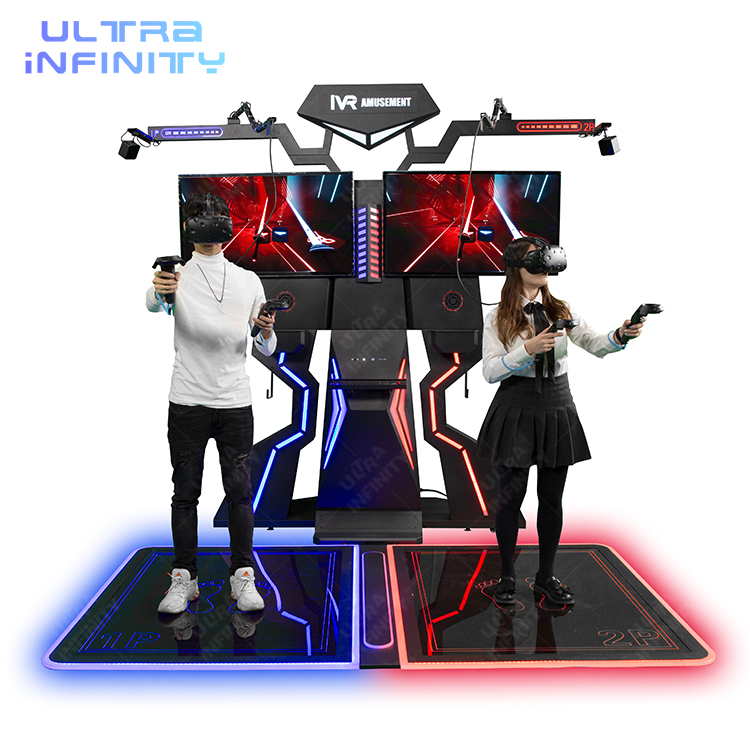
Two players
HTC VIVE VR Standing Platform
A two-player standing platform built around the HTC VIVE tracking family, with a defined play area that suits a wall or corner placement and precise hand tracking for aiming and interaction.
View Details ›
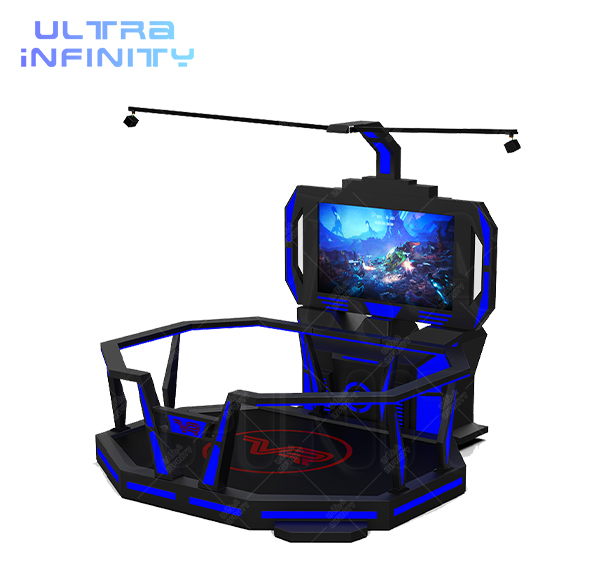
Standing zone
VR Space Plus Standing Platform
A wider VIVE-based standing platform for a dedicated corner or hall side, specified with its tracked play area so you can size it against your floor before delivery.
View Details ›
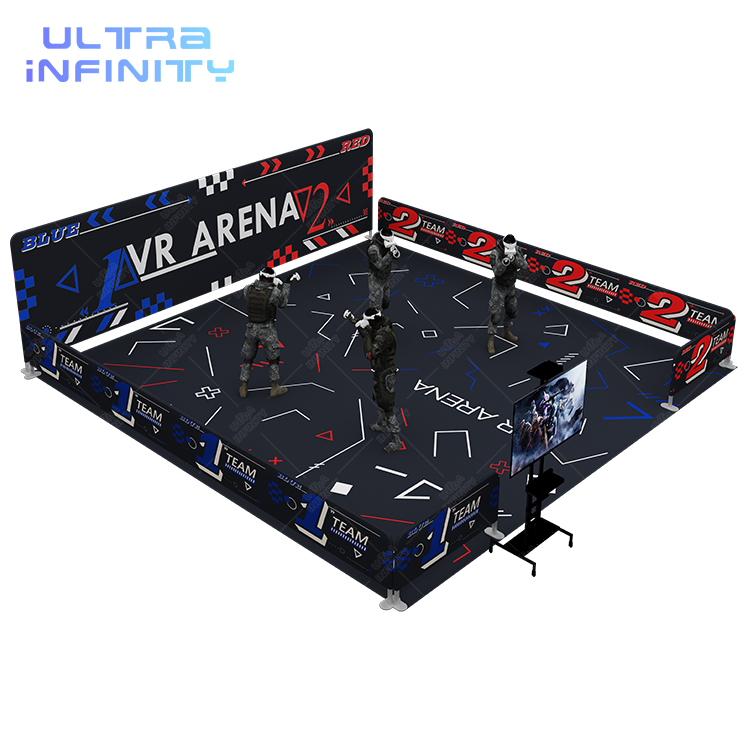
Multi-guest roaming
Free Roaming VR Arena 2.0
A multiplayer roaming arena where several guests share one tracked volume, walk the space and play as a team - the machine where the play boundary is designed, not improvised.
View Details ›
12. VR Tracking FAQ
The questions venue buyers ask about tracking, in the order they ask them.
How does VR tracking work in simple terms?
The headset and controllers report a pose - position plus orientation in three axes each - many times per second. Inertial sensors detect fast rotation, optical tracking supplies an absolute position so errors do not drift, and software fuses the two into the pose stream the renderer uses. That stream has to be accurate, fast and uninterrupted for the experience to feel real.
What is the difference between inside-out and outside-in tracking?
Outside-in places base stations in the room that sweep infrared beams and watch sensors on the headset and controllers; it is very accurate and works in bright rooms but needs installation and line of sight. Inside-out puts cameras on the headset that map the room themselves; it needs no installation and scales with open floor, but controllers that leave the camera view lose tracking and featureless or very bright spaces are harder to read.
How big is a tracked play area?
For the outside-in SteamVR family the manufacturer specifies about 5 x 5 m with two base stations and about 10 x 10 m with four. Inside-out systems are limited by the open floor you can give them and by how many guests share it, not by room hardware. In every case the usable volume is smaller than the room, because edges, obstacles and reflections cut into it.
What causes VR tracking to lose position?
Four causes dominate: occlusion (a body or object between the sensor and what it is watching), reflective or mirrored surfaces that create false readings, featureless and very bright conditions for camera-based systems, and setup errors such as base stations at the wrong height or angle. Consumables - low batteries, worn cables - surface as tracking symptoms too.
Why does tracking matter for motion sickness?
Measured motion-to-photon latency runs from roughly 21 to 42 ms in real headsets, with the controller typically slower than the headset. Reprojection can re-warp a rendered frame, but it cannot replace a pose that was never measured, so a tracking dropout shows the guest a world that moves without them. That mismatch is the same sensory conflict that makes people feel unwell.
Should I choose inside-out or outside-in for my venue?
Choose by deployment reality first. If the room is fixed, well-lit and the play area is defined, outside-in rewards you with accuracy and robustness. If you need to deploy quickly, move machines between sites, or open a large roaming floor without infrastructure, inside-out is the practical choice and the room - mat, boundary, surface treatment - becomes part of the specification.
13. Key Takeaways: How VR Tracking Works
Six lines to take into your next supplier conversation.
- Tracking is a volume, not a feature: define the region where the system can see the guest, then buy the machine that fits it.
- Two sensors, one pose. Inertial data gives speed, optical data gives an absolute position, and software fusion is what keeps the pose from drifting.
- Outside-in trades installation for precision and bright-light robustness; inside-out trades controller occlusion and visual conditions for fast deployment and a volume that grows with your floor.
- Occlusion is the number one paid-session fault, and it is a floor design problem as much as a hardware problem. Boundary, mat and surface treatment all reduce it.
- Latency is measured in tens of milliseconds and the controller is usually slower than the headset. Ask for both numbers separately.
- Test tracking with five actions in fifteen minutes - fast head snap, two-player crossing, edge walk, hands out of view, bright and dim hour - before you sign anything.
The next step is arithmetic on your own building: ceiling height, surface finishes, guest mix and the floor area you can give to a tracked volume. Send the plan through the free 3D layout design and we will mark out the usable volume and the machines that fit it, or start from the VR park solution overview for the full zone picture.
Size Your Tracking Volume
Tracking is a floor design problem. Review the VR park solution and send us your dimensions for a free 3D layout showing the tracked volume, the station shapes that fit it, and what each option includes.

