HOW VR WORKS - OPERATOR BRIEF
How Does Virtual Reality Work? The 4-Stage Loop Behind Every VR Headset
Virtual reality is a loop, not a screen: a headset senses where you are, renders the scene twice from that position, displays it through lenses, and corrects the delay before your brain notices. Here are the four stages, the numbers behind them, and what each one means when you are buying a machine.
The VR loop 6DoF tracking Stereo render 90 Hz Latency Comfort
21-42 ms
Measured Latency
110 deg
Class Field of View
1. How Does Virtual Reality Work: The Short Answer
A VR headset does not show you a moving picture. It runs a loop: it senses where your head and hands are, renders the scene from exactly that position, displays it, and then corrects the timing before your brain notices the gap. That loop repeats between 90 and 120 times per second, and it has four stages. We call it the VR loop, and almost every question about virtual reality - why it makes some people sick, why it needs a powerful computer, why one headset costs ten times another - comes back to one of these four stages.
- Sense - cameras or base stations establish exactly where the head and the hands are, in six degrees of freedom (6DoF).
- Render - the engine draws the scene twice, once for each eye, from slightly different positions.
- Display - two lenses present those images to the eyes with enough field of view and enough refresh to feel solid.
- Correct - the system measures and hides the delay between your movement and the light reaching your eye (motion-to-photon latency).
Run the loop and the brain accepts the scene as a place. Break the loop and the same brain rejects it within seconds - which is exactly what happens when a cheap attraction stutters, lags or loses tracking mid-session.
This article walks the four stages in the order they happen, using peer-reviewed latency measurements and manufacturer specifications rather than marketing copy. Then it translates each stage into the one thing a buyer actually needs: the specification you should demand - and what it costs you when it is missing. If you already know you want VR on a floor and just need the machine decision, skip ahead to the VR park solution overview or go straight to our free 3D layout tool.
2. Stage 1 - Sense: How a Headset Knows Where You Are Looking
The loop starts with position. Virtual reality is rendered from your point of view, so the system has to know where that point is, continuously, typically dozens of times per second. There are two things to measure: how far the head can move (degrees of freedom) and what device does the measuring (tracking family).
- 3DoF (three degrees of freedom) - rotation only: you can look left, right, up, down and tilt. The world turns around a fixed point. Older phone-based headsets and simple seated rides work this way, which is why leaning forward produces no change in the image.
- 6DoF (six degrees of freedom) - rotation plus translation: you can also step, duck, lean and walk. Every modern attraction-class headset used for shooting, free-roam or flight content is 6DoF, because leaning around cover is the entire point of those games.
- Outside-in tracking (base stations) - two or more emitters sweep the room and the headset computes its position from timing signals. This is the SteamVR / Lighthouse family used in standing platforms and room-scale arenas. Valve's base stations are officially specified as running at roughly 3,600 RPM, which works out to about 60 sweeps per second per axis.
- Inside-out tracking (cameras on the headset) - the headset maps the room with its own cameras and needs no external hardware. Excellent for seated rides, small footprints and standalone fleets; the trade-off is sensitivity to very bright light, low-texture walls and fast motion.
Independent hardware analysis of the Lighthouse system measured jitter below roughly 0.3 mm at close range, with root-mean-square precision around 1.5 mm - effectively millimeter-class accuracy in a working room. Valve's own hardware specification states the practical play volume as roughly 5 x 5 m with two base stations and about 10 x 10 m with four.
Those are the numbers to hold on to, because they bound everything downstream: the tracking volume decides how many guests can share one session, and the tracking family decides whether your attraction can tolerate arcade lighting. An attraction that loses tracking when a guest raises a controller above their head will be complained about at the counter, not in the engineering notes. For a gun-based attraction the same stage also decides accuracy - our own gun tracking breakdown in how optical gun tracking works walks through how much of the shot is tracking and how much is software.
Venue translation: if you are buying a standing or roaming attraction, ask for outside-in base-station tracking, or inside-out with proven room-scale performance. If it is a seated ride, both families are acceptable.
3. Stage 2 - Render: Why Every Scene Is Drawn Twice
Your eyes sit about 6 to 7 cm apart, so each eye sees a slightly different version of the world. That horizontal offset, the parallax, is the depth cue a VR system reproduces: the engine renders the scene from the left eye position and again from the right eye position, and the lenses present each image to its own eye.
Stereo is only one depth cue, and it is not the strongest one in a room. Research on depth perception in virtual reality systems (Vienne and colleagues, 2020) examined how screen distance and the availability of motion parallax change perceived depth - the practical lesson for a venue is that head and body movement carries a great deal of the depth impression. That is why 6DoF tracking and stereo images reinforce each other: the stereo pair supplies the offset, and your movement supplies the parallax. Take either away and the image flattens.
Drawing two images instead of one has a cost, and it is the reason a venue PC is not a home PC. Rendering from two viewpoints roughly doubles the geometry work per frame, and the loop has to finish the whole frame in about 11 ms at 90 Hz. Venue hardware compensates in three ways:
- Two dedicated panels or one split panel at native resolution, so the headset does not upscale a single image twice.
- A desktop-class GPU, because a stutter that a monitor user shrugs off is a visible break in the loop for a headset user.
- Software tricks such as reprojection and foveated rendering, which reuse or prioritize parts of the frame instead of computing everything twice at full detail.
The interpupillary distance (IPD) setting belongs to this stage as well. Each guest's eyes are a different distance apart, and the two rendered viewpoints must match it or the depth feels subtly wrong and small text blurs. That is why adjustable IPD is a specification to check on any headset you plan to put on children and adults in the same afternoon - see the headset selection criteria in how to choose a commercial VR headset.
4. Stage 3 - Display: Refresh Rate, Persistence and Field of View
Stage three is optical: the two images have to arrive at the eyes fast, in the right place, and with enough angular coverage that the world does not end at a visible frame. Four specifications carry the experience.
| Specification |
Venue baseline |
What it changes on a paid floor |
| Refresh rate |
90 Hz floor; 120 Hz preferred for fast content |
How solid fast motion looks. Below 90 Hz, flicker and stutter become noticeable on pulsed displays; fast racing and shooting scenes are where guests notice first. |
| Field of view |
Around 110 degrees in the VIVE / VIVE Pro class |
How much of the world exists outside the center of the image. Wider FOV increases speed perception and presence - which is what guests are paying for. |
| Resolution |
2160 x 1200 combined, or 2880 x 1600 in the VIVE Pro class |
Screen-door effect and text legibility: scoreboards, HUDs, target markers and the fine detail that makes a shooter readable. |
| Persistence and reprojection |
Low-persistence display plus frame interpolation |
How much motion blur and judder a guest sees when the guest turns their head quickly. |
The reference points here come from manufacturer spec sheets, which are the safest place to compare units. For example the HTC VIVE Pro class headset is officially specified at 2880 x 1600 combined resolution, 90 Hz refresh and a 110 degree field of view; the VIVE Business Edition lists 1080 x 1200 per eye (2160 x 1200 combined), 90 Hz and 110 degrees. These are manufacturer-published figures, and they are the numbers to hold a supplier to when a marketing page claims "4K VR".
Refresh rate deserves one extra sentence because it is the specification most often traded away to save money. At 90 Hz the loop has about 11 milliseconds per frame; at 60 Hz it has about 16.6 ms, and the extra 5 ms shows up as visible double-imaging when a guest turns their head. On a showroom floor with a seated, slow cinematic ride, a 60 Hz panel is survivable. On an attraction where guests stand, aim and move, 90 Hz is the minimum and 120 Hz is the honest target.
Buying test for the display stage: put the headset on, turn your head as fast as you can, and watch the edges of the image. If the world smears or the edges flicker, guests will call it a headache, not an attraction.
5. Stage 4 - Correct: Motion-to-Photon Latency and Reprojection
The last stage is the one that makes virtual reality hard. Every step has a delay: the sensor samples, the software predicts, the GPU renders, the panel refreshes, and the light reaches your eye. The total is called motion-to-photon latency, and it is measured in milliseconds.
A peer-reviewed measurement study of consumer headsets (Warburton and colleagues, published in Behavior Research Methods) recorded delays of roughly 21 to 42 milliseconds across headsets when a user starts moving suddenly, and found that once the system learns the movement pattern the functional delay drops to about 2 to 13 milliseconds. Test equipment vendor documentation commonly cites a research-derived threshold of roughly 20 milliseconds as the point where latency becomes noticeable in virtual and mixed reality. Read that as a research reference, not a hard cutoff: the honest statement is that the lower the delay, the fewer complaints.
Manufacturers publish their own figures as a baseline. HTC documents roughly 22 ms for the headset and about 31 ms for the controller path on the VIVE generation used in many attraction cabinets. Both numbers sit inside the range the research recorded.
Because the loop cannot be made infinitely fast, every commercial system cheats, and the cheat is called reprojection: the engine reuses the last rendered frame and warps it to match the newest tracking sample. A 45-frames-per-second render can be presented at 90 frames per second this way. It is the reason a mid-range venue PC can drive a 90 Hz headset at all - and the reason a badly tuned station feels swimmy. When reprojection is doing too much work, straight lines bend as you turn, which is the artifact guests describe as "it looked fake".
For a venue, latency is not a spec sheet item you can read off. It is an acceptance test. Run one session on the machine you are about to buy, turn your head sharply, and watch a fixed object in the scene. If it swims or lags behind your movement, that same defect is what a paying guest will complain about in week two - and it is usually cheaper to fix at the purchase decision than on the floor.
6. Why the Loop Feels Real - and What Breaks It
When the four stages stay aligned, guests report presence: the sensation of being somewhere rather than watching somewhere. Three things break it, and all three are worth knowing before you buy, because all three show up as refund requests or bad reviews rather than as ticket sales.
- Motion sickness from visual-vestibular mismatch - your inner ear says you are sitting still while your eyes say you are flying. Peer-reviewed reviews identify this mismatch as the core driver of VR motion sickness. It is why a moving seat that matches the virtual motion reduces discomfort, and why standing content that accelerates without any physical motion is the hardest case.
- Vergence-accommodation conflict - in a headset both eyes focus at a fixed lens distance while the vergence angle tells the brain the object is near or far. Most guests adapt in minutes; some do not, and small text becomes the practical symptom.
- Tracking and latency breaks - a single dropped frame or a lost controller during a paid 8-minute session reads as a broken machine, not as a technology limit.
The mitigation strategy is a combination of content design, machine type and session length, not a single setting. Seated motion rides such as the roller coaster simulator format use physical motion to align the senses; the cluster article on whether VR chairs reduce motion sickness covers the motion-cueing side in detail. The 6-axis motion layer that makes those rides convincing is explained in what 6DoF motion actually means.
Operator rule: keep first sessions short and gentle. Presence sells the second visit; nausea ends it at the first.
7. The Four Stages Are a Buying Checklist
Everything above collapses into four questions you can ask a supplier, plus the failure mode each question prevents. This is the same discipline we apply to our own product specifications.
| Stage |
Ask the supplier |
If the answer is weak |
| Sense |
Which tracking family, and what play volume per station? |
Guests lose tracking during normal play; free-roam becomes fiction. |
| Render |
Which GPU and headset class, and can it hold the target frame rate at full resolution? |
Reprojection carries the frame; straight edges bend when guests turn. |
| Display |
Refresh rate, field of view and combined resolution from the official spec sheet? |
Fast content smears, detail is unreadable, and the ride feels cheap. |
| Correct |
Can we run an acceptance session, and what are the measured latency and dropped-frame numbers? |
You discover a floor problem after installing the floor. |
Notice what is not on that list: the headset brand. Brand matters less than whether the four stages hold together in the machine you are buying. A premium headset bolted onto an under-specified PC with a 60 Hz panel and no acceptance test is a worse attraction than a mid-range headset inside a machine that was engineered around these four constraints. This is the same conclusion the cluster reached from the buying side in the commercial headset guide: choose the machine and let the headset follow.
8. What the Same Loop Looks Like on a Commercial Floor
A living-room headset runs the loop for one person in short sessions. A paid floor runs it for strangers, all day, with no supervision at the machine itself - and that changes the engineering in ways that never appear in a consumer review.
- Shared tracking volume - several guests in one play space must be tracked simultaneously and must not occlude each other. That is a system design question, not a headset question.
- Continuous duty cycle - the loop runs for 10 to 12 hours with ten-minute turns. Cooling, tether management and the PC's thermal headroom all become revenue items.
- Hygiene between sessions - the facial interface is the most-touched part of the loop and needs replaceable pads and a cleaning routine sized to your session count.
- Restart speed - a machine that needs five minutes of attention after a crash costs you a paid session; a machine built for unattended operation does not.
That operational layer - tracking volume per station, tether versus backpack, session length, throughput, staffing - is where most venue money is actually won or lost, and it deserves its own walkthrough rather than a paragraph here. Our companion guide on how VR works inside an indoor entertainment venue goes through the station part by part; this article stays on the mechanism. If you want to see the whole zone assembled, start from the VR park solution outline.
9. How to Choose a VR Station for Your Floor
The loop is identical in every VR machine; the machine type is chosen by the floor and the audience. Three placements cover most venues.
- For arcades and entertainment centres - prioritize throughput and durable standing rigs. A two-player standing platform such as our HTC VIVE VR standing platform keeps guests upright with base-station tracking and a 100-game library, which means one supervisor can run several units.
- For shopping malls and small footprints - prioritize content density per square metre. A multiplayer VR standing platform or a compact racing or flight cabinet fits a mall corridor placement without a dedicated hall.
- For rides, family zones and mixed-age audiences - prioritize comfort and motion. A 360 degree VR motion chair type ride seats guests who do not want to stand and shoot, and gives you a second price point next to your standing attraction. For flight content, a single-player 360 degree flight shooter covers the aviation audience.
Looking for a commercial VR machine? The models below match the placements above, and each one ships with its headset class, tracking, PC, content and warranty specified as a single unit.
10. Featured NextPlay Active Gaming Equipment
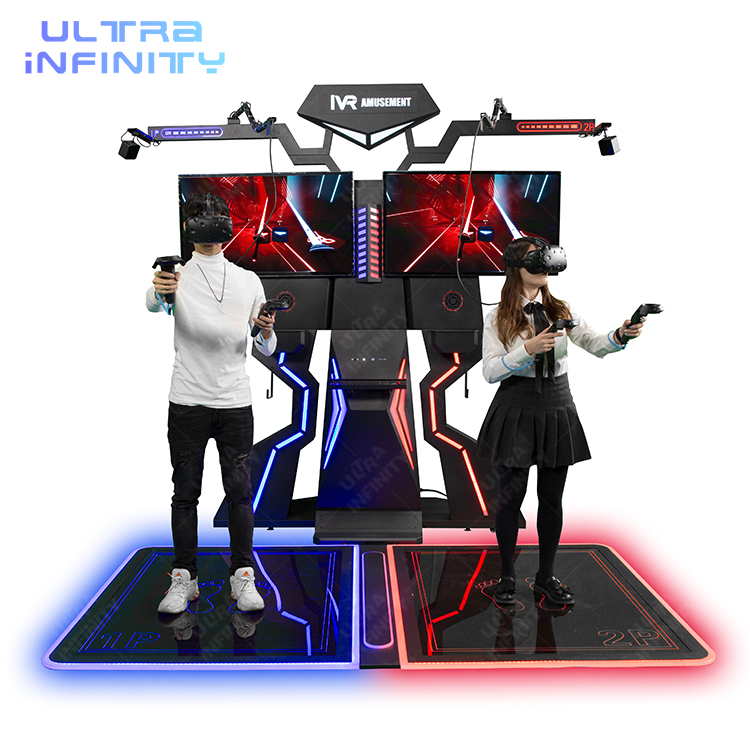
Two players
HTC VIVE VR Standing Platform
A two-person standing shooter built around the HTC VIVE class headset with base-station tracking, a 100-title library and a floor cabinet designed for commercial duty - 2.67 x 2.10 x 2.70 m, 110-240 V 2500 W.
View Details ›
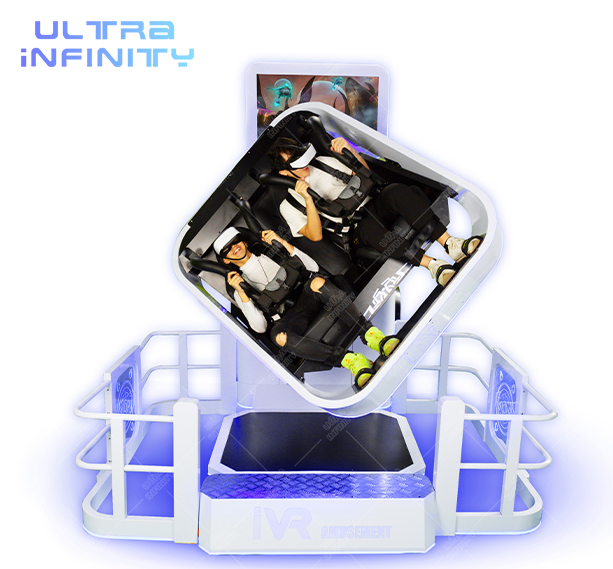
Two seats
360 Degree VR Motion Chair
A two-seat motion ride that pairs the virtual camera with real rotation and pitch, so the inner ear and the eyes agree - the practical cure for the comfort problem described in this article. Suits family zones and mixed-age audiences.
View Details ›
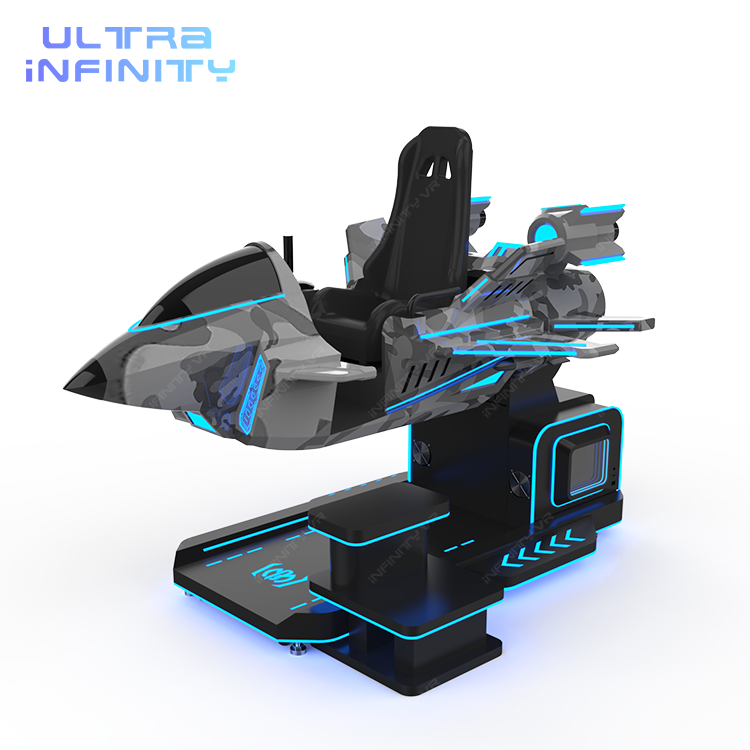
One player
VR Thunder Fighter F2
A single-player 360 degree flight shooter in a compact footprint, with a headset class chosen for fast-motion content and a game library aimed at the aviation-curious guest who has never worn a headset.
View Details ›
11. How Virtual Reality Works - FAQ
The questions guests and buyers ask most often, answered in one breath each.
How does virtual reality actually work?
A headset runs a four-stage loop many times per second: it senses where your head and hands are, renders the scene twice (once per eye) from that position, displays the pair through lenses, and corrects the delay between movement and image. When the loop stays fast and accurate, the brain treats the scene as a place.
Why do VR headsets need two screens or two images?
Because depth in VR comes from presenting each eye a slightly different view, the same principle as stereoscopic cinema. Rendering twice roughly doubles the graphics work per frame, which is why a venue PC is much stronger than a home PC.
What is 6DoF and why does it matter for an attraction?
6DoF means the system tracks rotation and translation: you can lean, duck and walk, not just look around. Leaning around cover is the core of shooting and roaming attractions, so 6DoF is a requirement for those machines, while simple seated rides can work at 3DoF.
What is motion-to-photon latency in virtual reality?
It is the total delay between you moving and the matching light reaching your eye, measured in milliseconds. A peer-reviewed study measured roughly 21 to 42 ms across consumer headsets at sudden movement onset; manufacturers publish figures such as about 22 ms for the headset on HTC VIVE generation hardware. Lower is better, and below about 20 ms is commonly cited as a research reference point.
Why does VR make some people feel sick?
The usual cause is a mismatch: your eyes report movement while your inner ear reports that you are sitting still. Peer-reviewed reviews identify this visual-vestibular conflict as the core driver of VR motion sickness. Physical motion that matches the virtual motion, shorter sessions and gentler content all reduce it.
Does refresh rate really matter for a commercial VR machine?
Yes. 90 Hz gives the system about 11 ms per frame; 60 Hz gives about 16.6 ms, and the difference is visible as smearing and double-imaging when guests turn their heads. 90 Hz is the venue floor and 120 Hz is preferred for fast racing, shooting and flight content.
12. Key Takeaways: How Virtual Reality Works
Five lines to keep the mechanism useful after you close this page.
- VR is a loop, not a screen: sense, render, display, correct - repeated 90 to 120 times per second.
- Tracking decides what guests can do. 6DoF is required for standing shooting and roaming; base-station tracking is the safer choice in bright arcade lighting.
- Stereo rendering is why VR is heavy. Two images per frame plus a hard frame budget is the reason venue hardware is specified differently from home hardware.
- Latency is the specification nobody prints: measured in tens of milliseconds, hidden by reprojection, and best verified with one acceptance session before purchase.
- Comfort and hygiene are loop requirements, not extras: match motion to the content, keep first sessions short, and plan replaceable facial pads from day one.
If you are now choosing what to put on the floor, the next useful step is not more theory - it is your own dimensions. Take the free 3D layout design with your room size and we will show which VR machines fit where, with the headset, tracking, PC, content and warranty included on every line.
Put the Loop on Your Floor
Understanding the loop is the first half of the decision; matching it to square metres is the second. Review the VR park solution or send us your floor plan for a free 3D layout with the machines that fit it.

